Manage your agent from Claude or ChatGPT
November 9, 2026
This month, we're sharing how we've made it possible for experts to get even more value from Answers From Me from within their personal AI agents. Read on for the new capabilities and links to details.
AI Tools and MCP
Answers From Me makes it easy to get started sharing your knowledge with your audience, regardless of your comfort level with AI. At the same time, we recognize that most of our users are making daily use of AI tools such as ChatGPT and Claude. These tools become even more powerful when connected to your other software, for example summarizing your emails or helping you edit a presentation.
As AI adoption increases, we believe that the best way for products like ours to deliver value to users is to make as much of the feature set as possible available to both humans and agents. Model Context Protocol, or MCP, is a popular mechanism for allowing agents to use other software. If MCP sounds familiar, it's because we introduced an MCP server for Answers From Me back in July with a number of seeker-facing tools: find an expert, list your experts, add an expert, and of course, ask an expert — all from within your ChatGPT, Claude, or other AI tools supporting MCP.
Manage Your Agent from Claude or ChatGPT
Now experts can fully manage their knowledge base, agent, audience, and conversations via MCP and our REST API. Sign in with your expert account, and from your AI tool you can:
- Catch up on what seekers asked, which questions your agent couldn't answer, and which answers were flagged or are waiting for your review
- Add content: paste a link, save something you wrote together, or upload a file
- Read and revise your content, and remove content your AI tool added
- Read conversations and send a seeker a better answer, including answers held for your review
- Save Q&A so your agent answers a question the way you would
- Check usage against your plan's limits
- See and invite seekers
This works on every plan, including Free, and your plan's usage limits apply as they do in the web app. Anything that reaches beyond your knowledge base asks you first: you see the exact text before a revised answer goes to a seeker, and you confirm an address before an invitation is sent.
Some AI tools show a file picker right in the chat, so a file goes straight from your computer into your knowledge base:
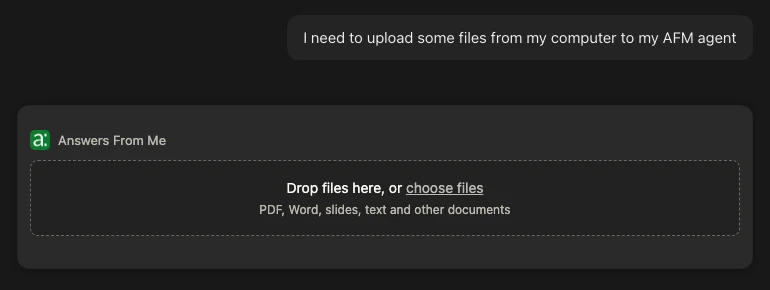
If you aren't an expert yet, you can start from your AI tool too: ask it to interview you, and it drafts your profile and agent for you to review in the app.
Learn more about managing your agent from Claude or ChatGPT
Connect your AI tool to Answers From Me
Guided Workflows
Guided workflows are simply a set of predefined prompts within the MCP server that help your AI tool perform common tasks with your agent. You can use the MCP server in many different ways, in combination with your AI tool's other skills and capabilities, but it may be difficult to get started. Guided workflows can help you start quickly, and then customize your workflow down the road.
Four guided workflows take your AI tool through common jobs step by step:
- Weekly review: see what happened this week, then go through the questions your agent couldn't answer and the answers seekers flagged, fixing them one at a time.
- Fill knowledge gaps: your AI tool looks through your own files and connected sources for answers you've already written, drafts them in your voice, and adds each one once you approve it.
- Write content together: open a document from your knowledge base, revise it with your AI tool, and save the new version in its place.
- Check usage: see which limits are close to full and what your options are.
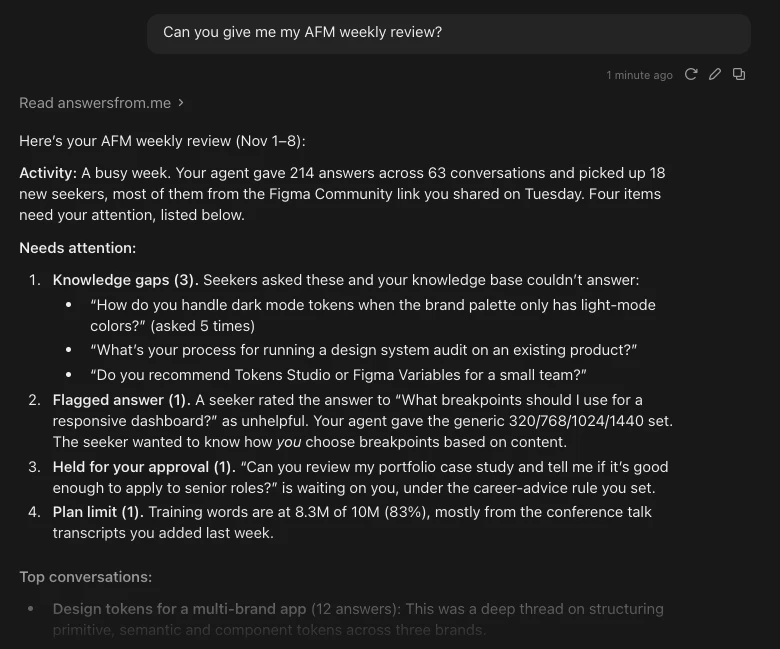
AI tools that support MCP prompts list these workflows next to the connector, and Claude Code shows them as slash commands. In ChatGPT, ask in plain language, for example "Let's do my weekly Answers From Me review."
Filling gaps puts two kinds of agent to work: your personal AI tool works privately with your files, and your Answers From Me agent speaks for you in public, from only what you approve.
Read the playbook: Fill Your Agent's Knowledge Gaps from Your Own Documents
The Expert REST API
For scripts and agents of your own, the new Expert REST API does everything your AI tool can, plus the settings we keep out of the chat:
- Your agent's settings: greeting, suggested questions, tone and length, thinking mode, showing sources and more
- Source options and rescans
- Hiding and unhiding items, and deleting any source, including content added in the web app
- Generating and listing insights
The REST API needs API access, which is part of the Basic plan and higher. It uses the same secret keys as the Open Responses API, and every route is documented at api.answersfrom.me/docs.
Learn more about the Expert REST API
Also New
- Cited sources in email replies. When your agent replies to an email, the reply now lists up to three of the items it cited, following your agent's source settings. Learn more about agent email replies
- The right media from each page. When a page carries media for many episodes or talks, your agent now picks up the ones the page is about, such as the single episode on an episode page, and gives each its proper title.
- More places to add content from. We continue to improve our support for TikTok profiles, Beehiiv newsletters, Medium articles and older Apple Podcasts episodes can now be added as sources. Learn more about adding content
- Older embeds upgraded automatically. Websites using our original embed code now get the current embedded agent, with the same color and agent, without changing the code. Learn more about embedding your agent
As always, this release includes many small improvements and bug fixes! We'd love to hear how these updates land for you. Share your feedback with our CEO Scott's agent at answersfrom.me/scott, or ask it from your AI tool with @@scott.
Cheers,
The Answers From Me Team