Setting Agent Notes for Seekers
Overview
Every seeker is different. One wants a quick answer, another wants the full story with examples, and a third has a background your agent should keep in mind. Agent notes let you customize how your Knowledge Agent responds to an individual seeker. Whatever you write in a seeker's Agent notes is given to your agent every time it interacts with that seeker, so the agent can tailor its answers to that person.
Agent notes are private to you and your agent. The seeker never sees them.
What to Put in Agent Notes
Agent notes work best as short, plain-language guidance about the seeker, for example:
- Response style — "Prefers lengthy responses with lots of examples" or "Keep it brief, they're usually on mobile"
- Background and interests — "Enthusiastic about aerospace" or "Runs a small bakery, not technical"
- Context from your relationship — "Cohort 3 student, working on the capstone project" or "Long-time client, already familiar with the basics"
- Things to avoid — "Doesn't want to be pointed to paid courses"
Your agent reads these notes alongside your content and its personality settings, so keep them factual and specific to the seeker. Anything that applies to everyone belongs in your agent settings instead (see Adjust Assistant Settings).
How to Set Agent Notes
- From your Expert Dashboard, click Home in the nav rail, then open the People tab
- Click the seeker you want to add notes for — their Participant details panel opens on the right
- Type your guidance into the Agent notes field
- Click Save and close
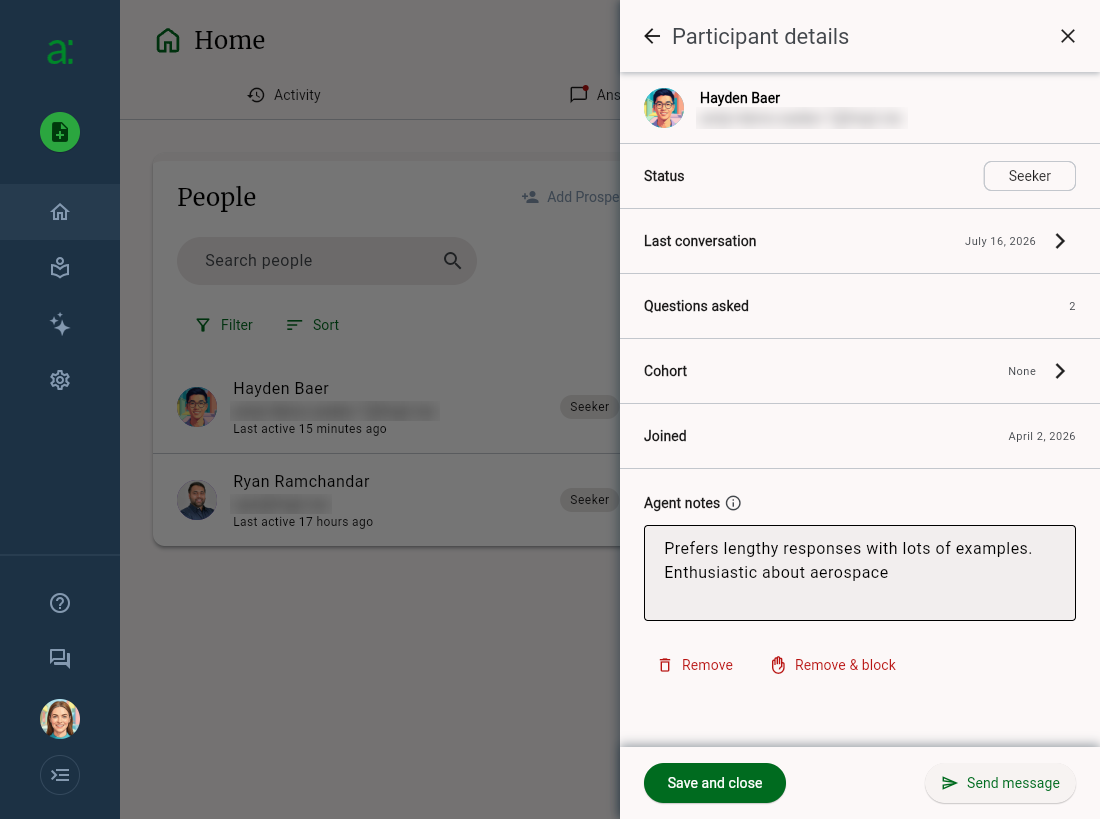
Agent notes entered for a seeker in the Participant details panel
Once saved, the note is shown beneath the seeker's name in the People list, and your agent uses it in every new conversation with that seeker. You can edit or clear the note at any time from the same panel.
Tips
- Update notes as you learn more. After reviewing a few of the seeker's conversations on the Answers tab, capture what you noticed about how they like to be answered
- Use notes for context you'd otherwise repeat. If you find yourself correcting the same answer for the same seeker, a note is often the quickest fix
- Notes are per seeker. To shape responses for a whole group, use cohorts (see Cohort Set Up and Management) or your agent settings
Getting Help
If you need assistance with Agent notes, check out the in app help (available from the Help button in the left navigation), review available help at https://help.answersfrom.me or contact support.