Plans, Usage and Limits
Every expert starts on the Free plan. It doesn't expire and needs no credit card, so you can build your agent, share it, and see how it answers before you pay for anything. Experts don't get a trial of the paid plans; when you need more capacity or a paid feature, upgrade to Basic, Plus or Pro. This article covers what each plan includes, where to see your usage, and what happens when you reach a limit.
Plans
| Free | Basic | Plus | Pro | |
|---|---|---|---|---|
| Price | $0 | $19/month | $69/month | $199/month |
| Billed every 6 months | — | $99 | $349 | $995 |
| Audience members | 50 | 500 | Unlimited | Unlimited |
| Training words | 500K | 2M | 10M | 25M |
| Stored content | 500 MB | 10 GB | 50 GB | 500 GB |
| Audio transcription | 60 min/month | 300 min/month | 6,000 min/month | 10,000 min/month |
| Answers | 100/month | 1,000/month | 10,000/month | 50,000/month |
Every plan includes your Knowledge Agent, your Expert Page, uploads and links, review and takeover of conversations, website embedding, answers read aloud, and access to your agent from ChatGPT, Claude and other apps through the MCP server. Each paid plan adds features:
- Basic adds activity alert emails, basic analytics and API access
- Plus adds automatic rescans and adding content by email, insights from sensitive content, per-source access control, cohorts, agent replies to inbound email, full analytics, and voice cloning
- Pro adds charging seekers for your agent, connecting a subscription platform such as Substack or Thinkific, and priority support
Organizations that need many expert seats or custom limits can ask about the Enterprise plan at support@answersfrom.me. The pricing page always has the current plans and prices.
See your usage
Click Settings in the left navigation of your Expert Dashboard, then the Account tab. The Usage card names your plan and the date your monthly counts reset, then shows one meter per limit:
- Answers and Audio transcription count up during the month and start again on the reset date
- Seekers, Storage and Training words are running totals. A meter says Almost full. at 80% and Over the limit. once you reach it
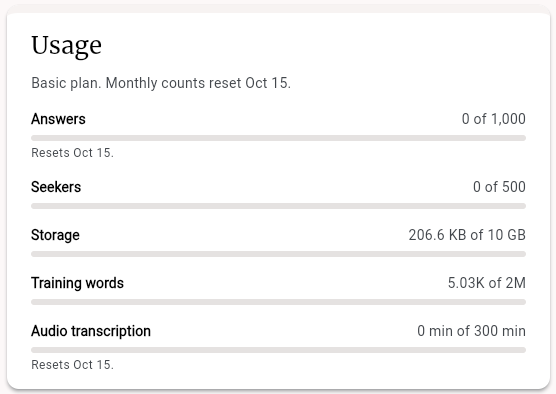
Your monthly counts reset on the same day each month: the day your paid plan started, or the day you created your agent on the Free plan. Dates after the 28th reset on the 28th. The Usage card always shows the next reset date.
Change your plan
The Subscription Plan card, below Usage, lists the plans and marks your Current plan.
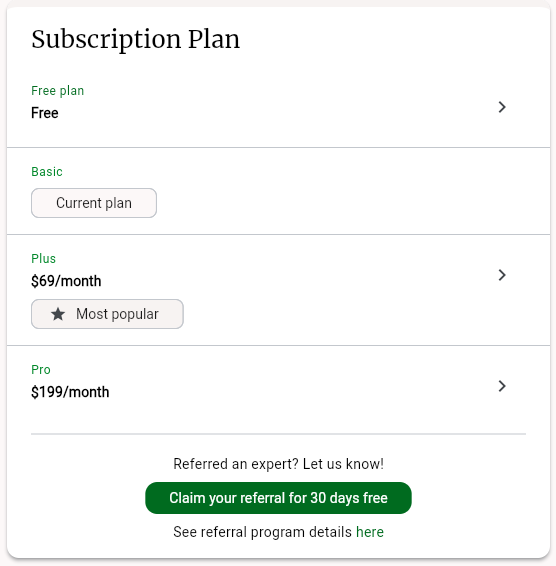
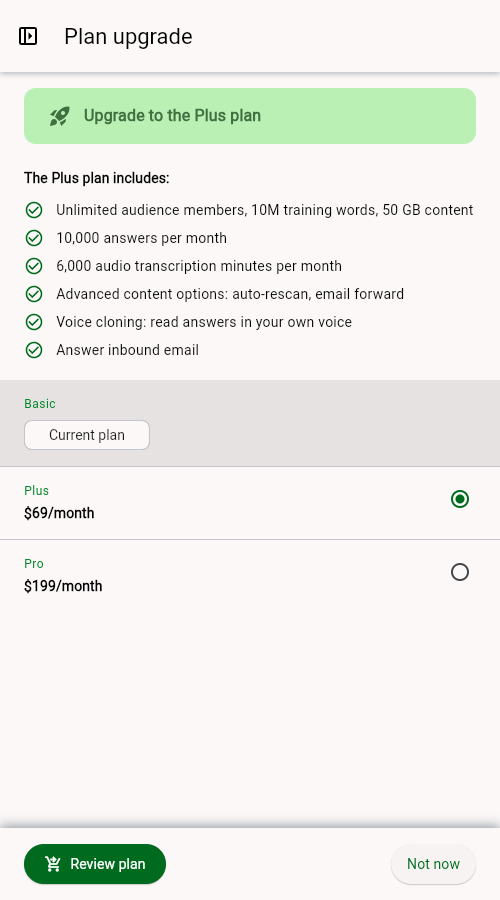
To upgrade, click a higher plan. The Plan upgrade sheet lists what the plan includes. Choose the plan you want and click Review plan.
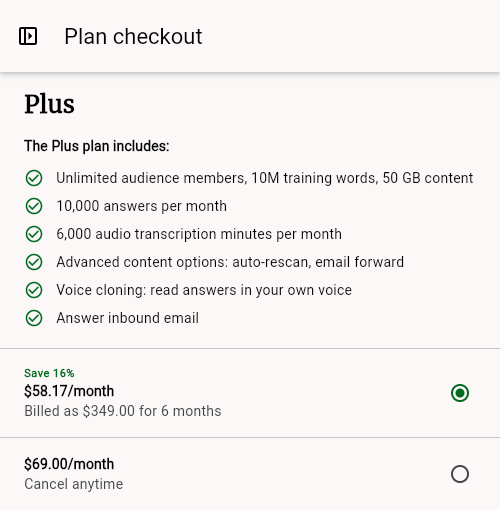
Plan checkout offers two ways to pay: every 6 months, which costs less per month, or monthly, which you can cancel anytime. Pick one and click Checkout to pay on a secure Stripe page, which opens in a new window. If nothing opens, allow pop-ups for Answers From Me and try again. Your new limits and features apply as soon as the payment goes through.
To downgrade or cancel, click a lower plan (or Free plan) and then Manage subscription. Plan changes and cancellations are handled in Stripe.
When you reach a limit
Answers From Me tells you when an action needs more room than your plan has. The sheet that opens shows the meter for that limit, the plans that raise it, and buttons to Upgrade, Compare all plans, or close it with Not now. On Pro, it offers to Contact us about Enterprise limits instead.
Answers
When your agent has used the month's answers:
- New questions from seekers are held for you instead of being answered. The seeker sees "Your message has been submitted for review" and is told they'll get a reply once you've reviewed it
- On the Answers tab of your Home page, each held question shows Out of answers and the date your answers come back. Click Write it yourself to reply now. After the reset or an upgrade, Draft answer has your agent draft a reply for you to review
- Held questions arrive in your activity email with the reason Answers Used Up, even on the Free plan
- Questions emailed to your agent by people without an Answers From Me account get a reply that you can't take more questions right now; email from people with an account is held like any other question. Questions sent through the API are refused until answers are available again
- Your own test questions open the Answers limit sheet
Held questions stay held after the reset or an upgrade, so the reply always comes from you.
Audience members
Seekers can always join your agent. Once you're past your plan's audience limit, the extra members appear on the People tab as "Audience member", without a name or email, until you upgrade. Adding a prospect or a new participant yourself opens the Audience members limit sheet.
Storage
An upload that won't fit opens the Storage limit sheet, which shows how much room you have left. Smaller uploads still go through. Free up room by deleting files you no longer need, or upgrade.
Training words
Content past your training words limit isn't added to your agent's knowledge. Uploads, link crawls, feeds and rescans still run, and each item that didn't fit shows a notice such as "Training words limit reached" with an Upgrade button. Your Home page also shows Some content isn't indexed with how far over you are. After you upgrade or remove content, the notice offers Rescan.
Audio transcription
Audio and video are transcribed only when the whole recording fits in the minutes you have left this month, so a long recording can be refused before you're completely out. Everything already transcribed keeps working. Minutes come back on your reset date; after the reset or an upgrade, click Rescan on an item that wasn't transcribed.
Features that aren't on your plan
Switches and buttons for paid features stay visible on every plan. Turning one on, for example Enable API keys on the Connect tab or Require paid subscription to your agent in Agent monetization, opens the Plan upgrade sheet with the plan that includes it. The switch stays off until you upgrade. Turning a feature off is never blocked.
If your plan ends or you downgrade
When you move to a lower plan, features your new plan doesn't include change like this:
- API access, activity alert emails, agent email replies, automatic rescans, adding content by email, and voice cloning are switched off. Your voice clone is kept in case you upgrade again
- Per-source access control and sensitive content insights keep your existing settings, but you can't change them
- If you charge seekers or connect a subscription platform, our team gets in touch about your paid agent
When a paid plan ends and you're back on Free, we also email you the features your plan no longer includes, starting with the ones you were using, and a banner in the app offers See plans and pricing.
Your content, conversations and seekers stay in place. If you're over a limit on the new plan, your Home page says so, and new content past the limit isn't added to your agent until you free up room or upgrade.